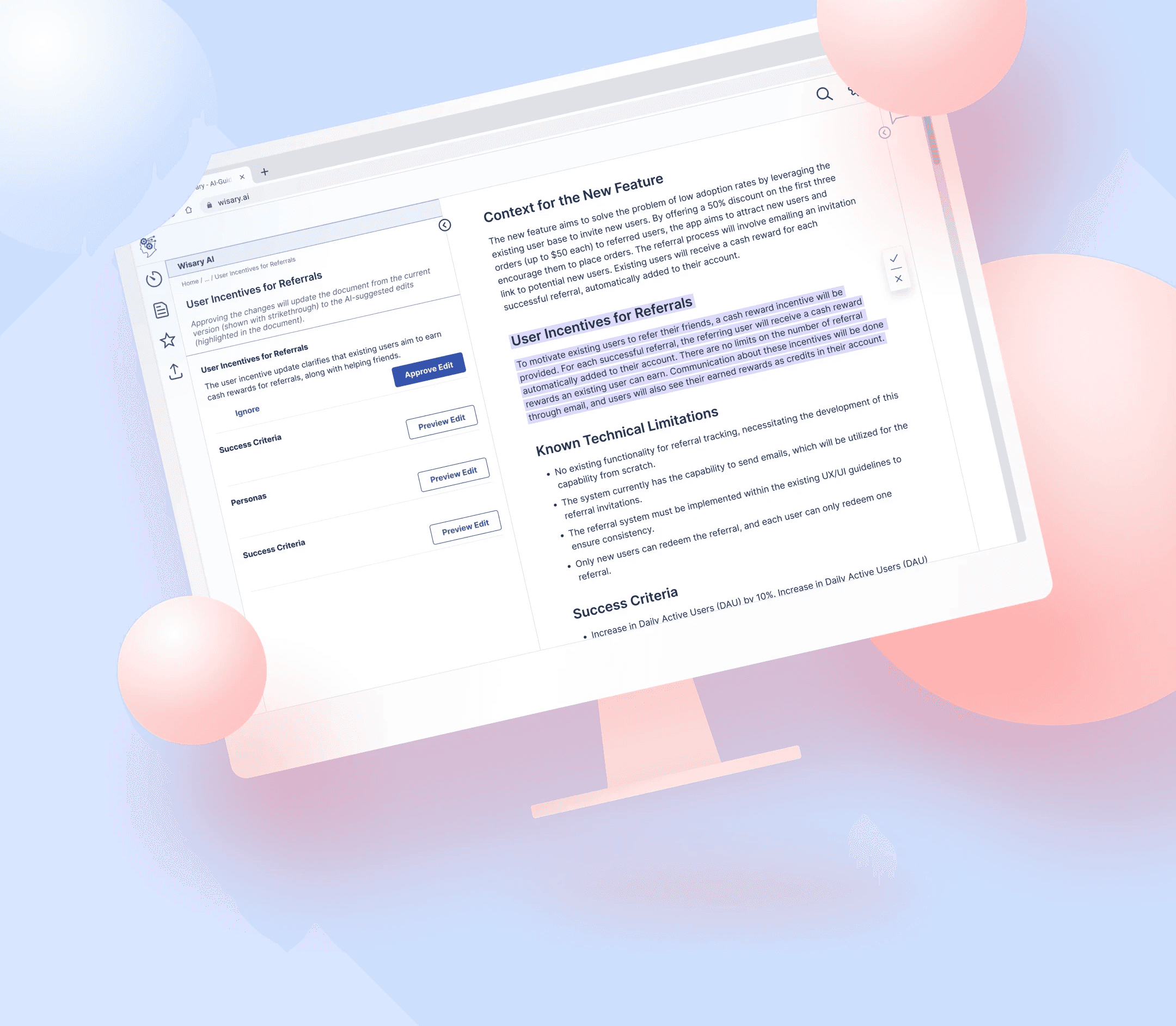
Wisary AI for Product Managers
Redesigning an AI collaboration tool that users tried once — and never came back to
Wisary is an AI collaboration tool that helps product managers and engineers stay aligned through the messy middle of building software. We redesigned it to solve one problem: users tried it once and never came back.
Client
Wisary
My Role
UX Consulting
UX Design
Prototyping
Tools
Figma
Dovetail
Confluence
Timeline
13 Weeks
Apr - Jul 2024
Team
Alina Aminova
Jada Olivia
Shahi Anwar
Project Timeline

Problem
The Brief We Were Given — and the One We Chose Instead
Wisary's founder came to us with a clear ask: design a feature that helps product managers generate detailed requirements from their high-level PRDs. But one number told a different story — users were trying Wisary once and not coming back. Retention, not features, was the real business problem.
So before designing anything, we challenged the brief. "Generate detailed requirements" was a solution. What was the problem it was meant to solve — and was it even the reason users left? With our mentor's and the founder's buy-in, we reframed the project around a single research question:
Why don't Users Come Back?
This reframing changed everything downstream. Instead of designing a feature nobody had validated, we set out to find what would actually earn a product manager's return.
THE BRIEF WE WERE GIVEN
Generate detailed requirements
a solution
we reframed
➜
THE QUESTION WE CHOSE
Why don't users
come back?
the problem
Research
Understanding the Market
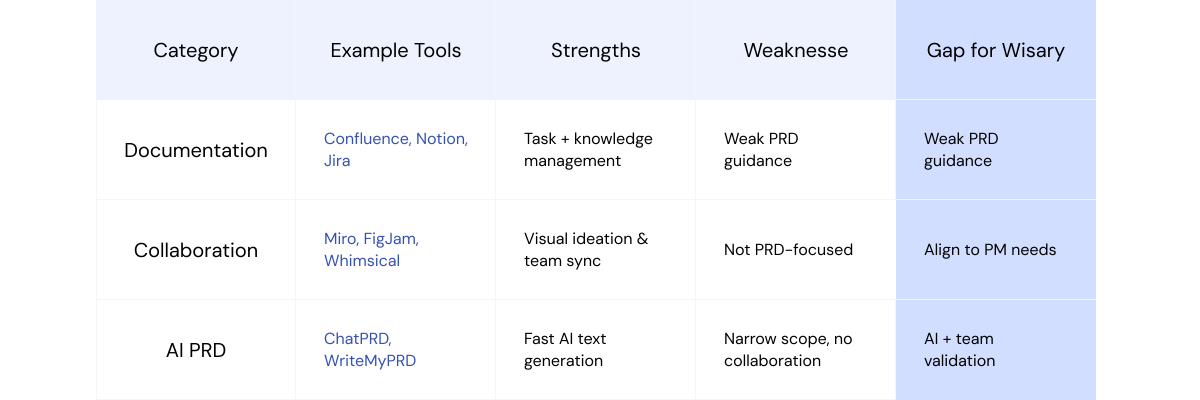
Existing tools each own a slice of the workflow — ChatPRD drafts, Confluence stores, Jira tracks — but none connect the full loop from requirement to conversation to decision. That gap was Wisary's opportunity.
Listening for the "Why"
We interviewed 23 product and engineering professionals across two groups: 6 current and former Wisary users shared by the founder, and 17 product managers, founders, and engineers from our own networks. The first group told us why they left; the second told us what a returnable tool would need to do.
Not every participant was a perfect match for the target user — a reality of recruiting on a startup timeline. We treated the off-target conversations as breadth, and weighted the on-target product managers most heavily when defining the problem.

What We Heard
One former user captured the core problem in a single line:
"The app seems very much like a one-and-done rather than an app I can adopt company-wide"
That was the pattern. Wisary helped write a document — then went quiet for everything that happens next: the engineer questions, the meeting decisions, the stakeholder buy-in. Users didn't abandon Wisary because it lacked features. They abandoned it because it left the moment the first draft was done.
Define
The Root Cause: Wisary Stopped Being Useful After the First Draft
Synthesizing 23 interviews in Dovetail, the frustrations clustered into one pattern. Users didn't leave because Wisary did too little in the moment — they left because it did nothing after the moment. The PRD got written, and then the tool fell silent for everything that determines whether that PRD survives contact with a real team.
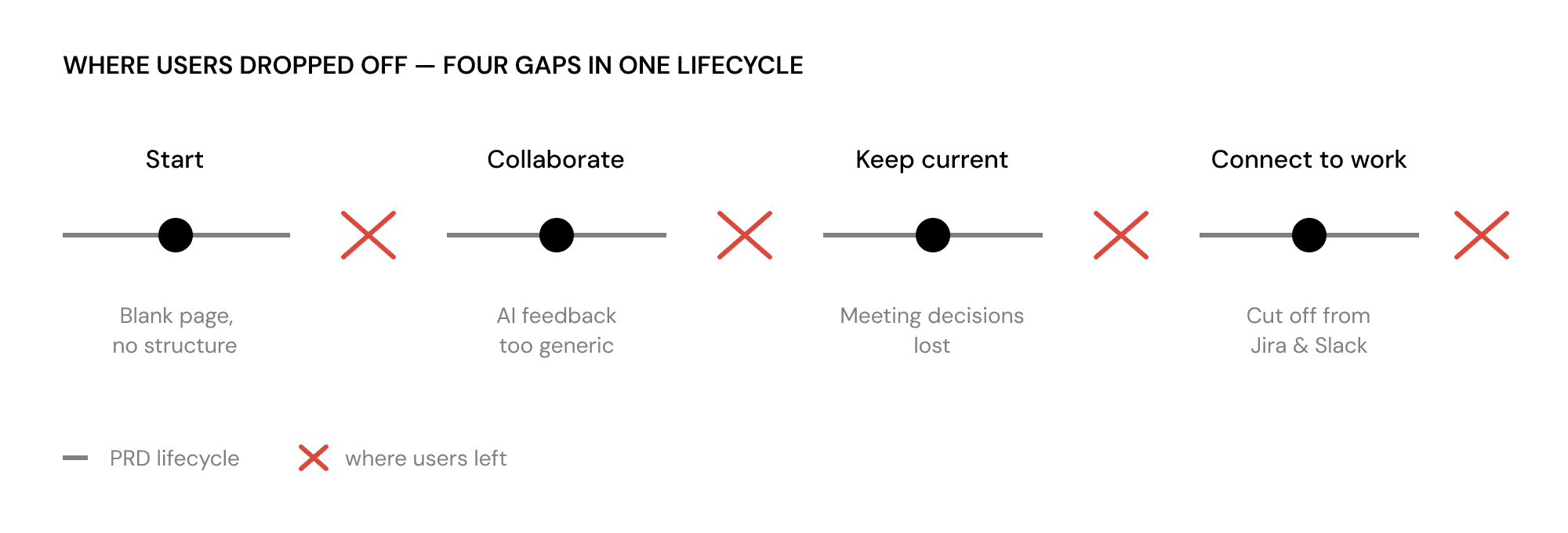
We mapped the drop-off to four breakpoints across the PRD's life:
Starting — Blank pages and unclear structure made it hard to begin. Users didn't know what a good PRD needed.
Collaborating — AI feedback felt generic and detached from the document, so acting on it meant hunting through long text.
Keeping current — Decisions made in meetings never made it back into the PRD, leaving it outdated the moment a conversation ended.
Connecting to work — Wisary lived apart from Jira, Slack, and Confluence, so it never became part of how work actually got done.
Seen together, these weren't four separate complaints. They were four gaps in a single lifecycle — and they told us exactly what to design.
Design
From Four Gaps to Four Flows
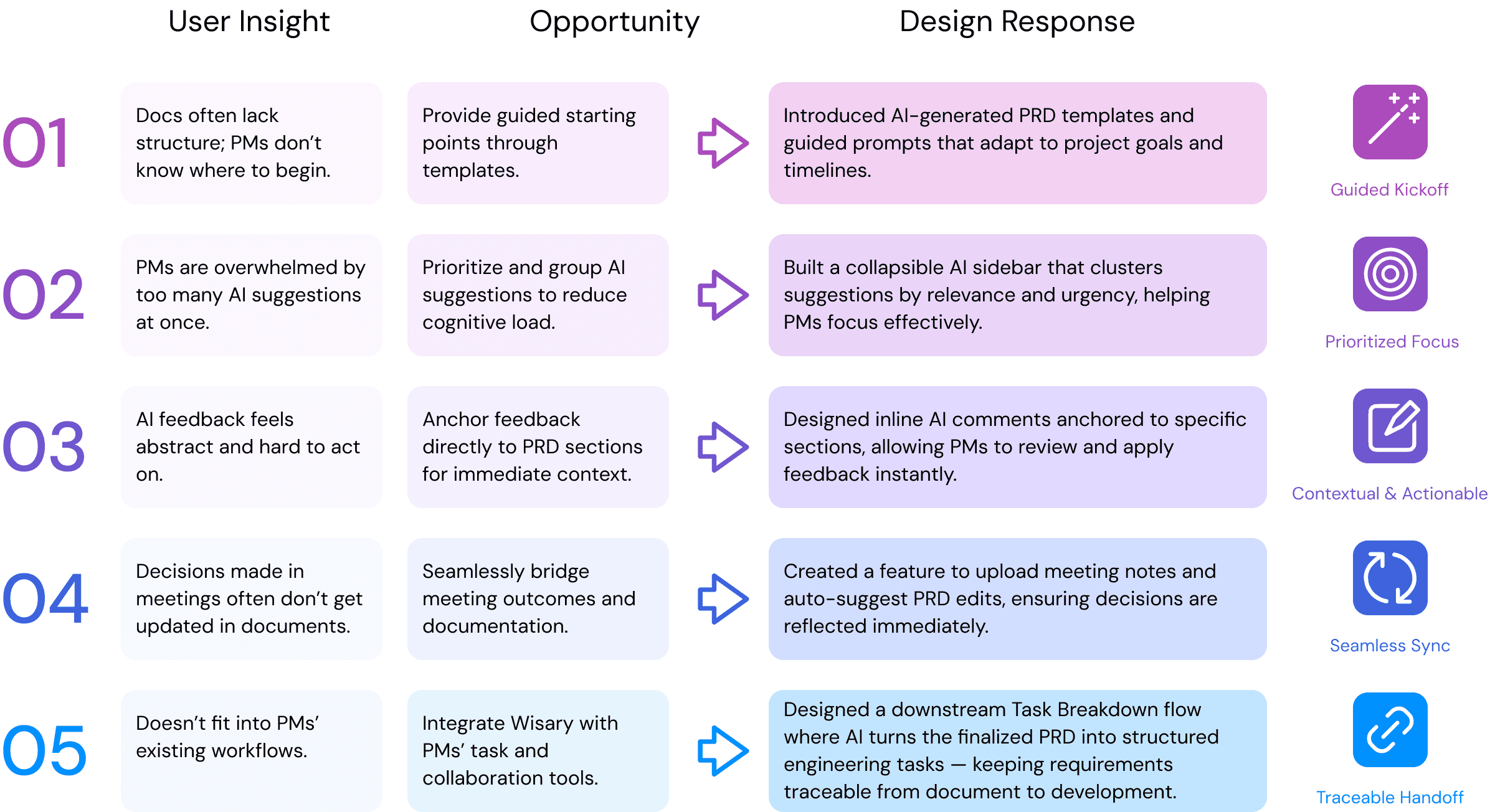
The research pointed to one fix: Wisary had to stay useful across the whole PRD lifecycle, not just the first draft. We designed four connected flows — each one closing a gap where users had been dropping off. Underpinning all four is a single principle we heard again and again: AI drafts, humans verify. Nothing reaches the document without the product manager's approval.
Though this case study follows the product manager's journey, the same pattern was designed to carry across the team: the engineering lead's Task Breakdown and the QA team's Test Plan each run through the same create → refine → AI-review flow — keeping a single requirement traceable from product intent all the way to test coverage.


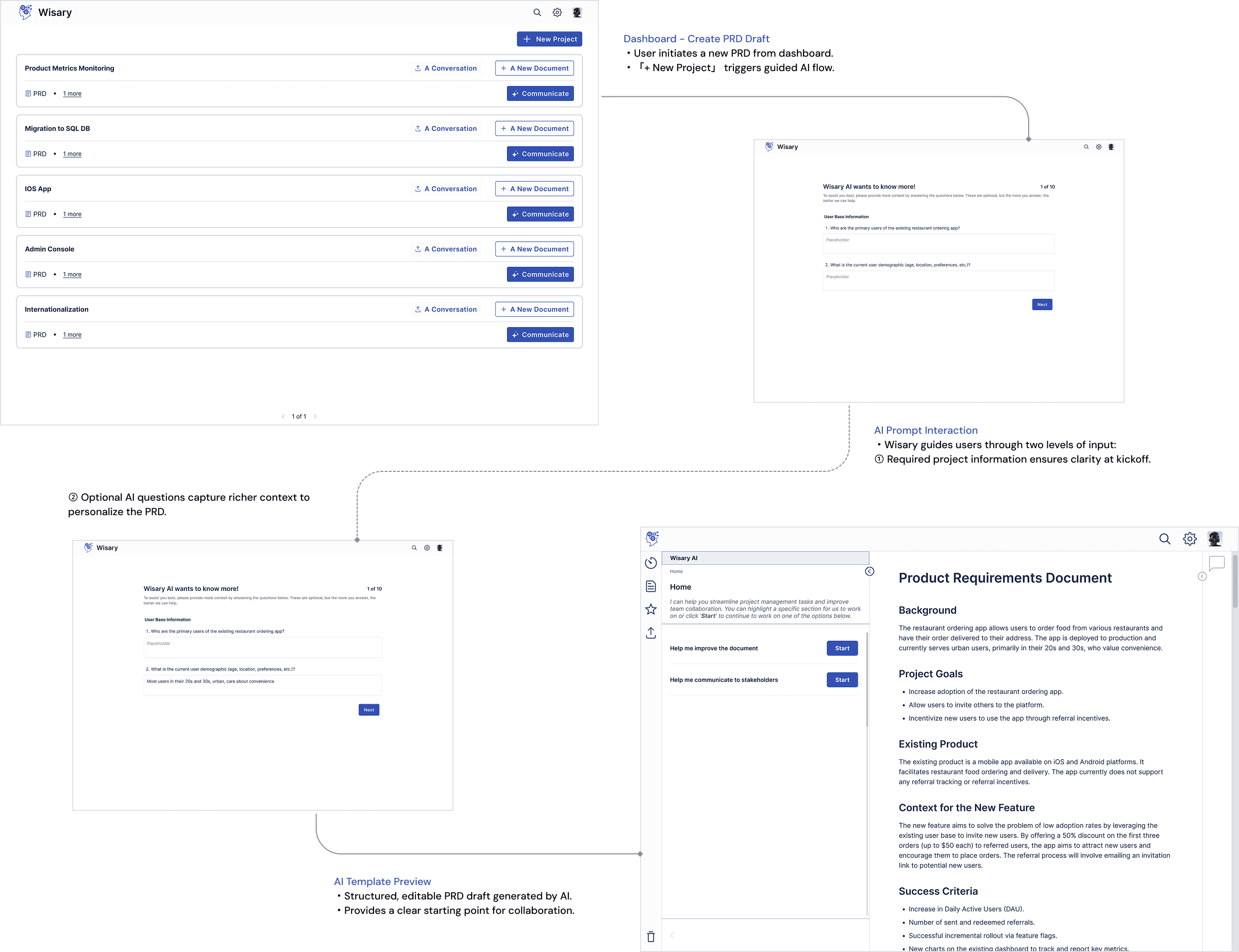
Help product managers start faster with clarity and confidence.
Context
Interviews showed PMs stalling at the blank page. Without structure, they didn't know what a good PRD needed or where to start.
Design challenge
How might we move a PM from a blank page to a structured, editable draft in minutes?
Solution
Wisary suggests a template based on the document's goal (leadership buy-in vs. implementation), type, and scope, then asks a few contextual questions to draft an initial PRD. Crucially, it never auto-fills without input, and every section stays fully editable.
Impact
PMs start from a structured, goal-appropriate draft instead of a blank page — lowering the barrier to the first document and setting a consistent foundation for everything downstream.

Transform abstract AI feedback into actionable collaboration.
Context
AI feedback felt generic and detached from the document, and engineers' input arrived ad hoc in scattered meetings. Acting on either meant hunting through long text.
Design challenge
How might we make AI feedback specific, contextual, and tied to the exact place it applies?
Solution
Inline AI comments anchor feedback to specific sections. A collapsible AI sidebar clusters suggestions by relevance so PMs aren't overwhelmed. PMs generate questions for engineers, post them as comments, and Wisary extracts the decisions from the thread and suggests inline edits — which the PM reviews and approves one by one.
Impact
Feedback became traceable to the exact section it concerns; engineer input got captured in context instead of lost in meetings; and the PM stayed in control of every change.


Keep documentation and meeting decisions perfectly aligned.
Context
Decisions made in meetings rarely made it back into the PRD, leaving it outdated. And stakeholders didn't want to read a full PRD to weigh in.
Design challenge
How might we keep documentation in sync with conversations, and let a PM share the right slice with each stakeholder?
Solution
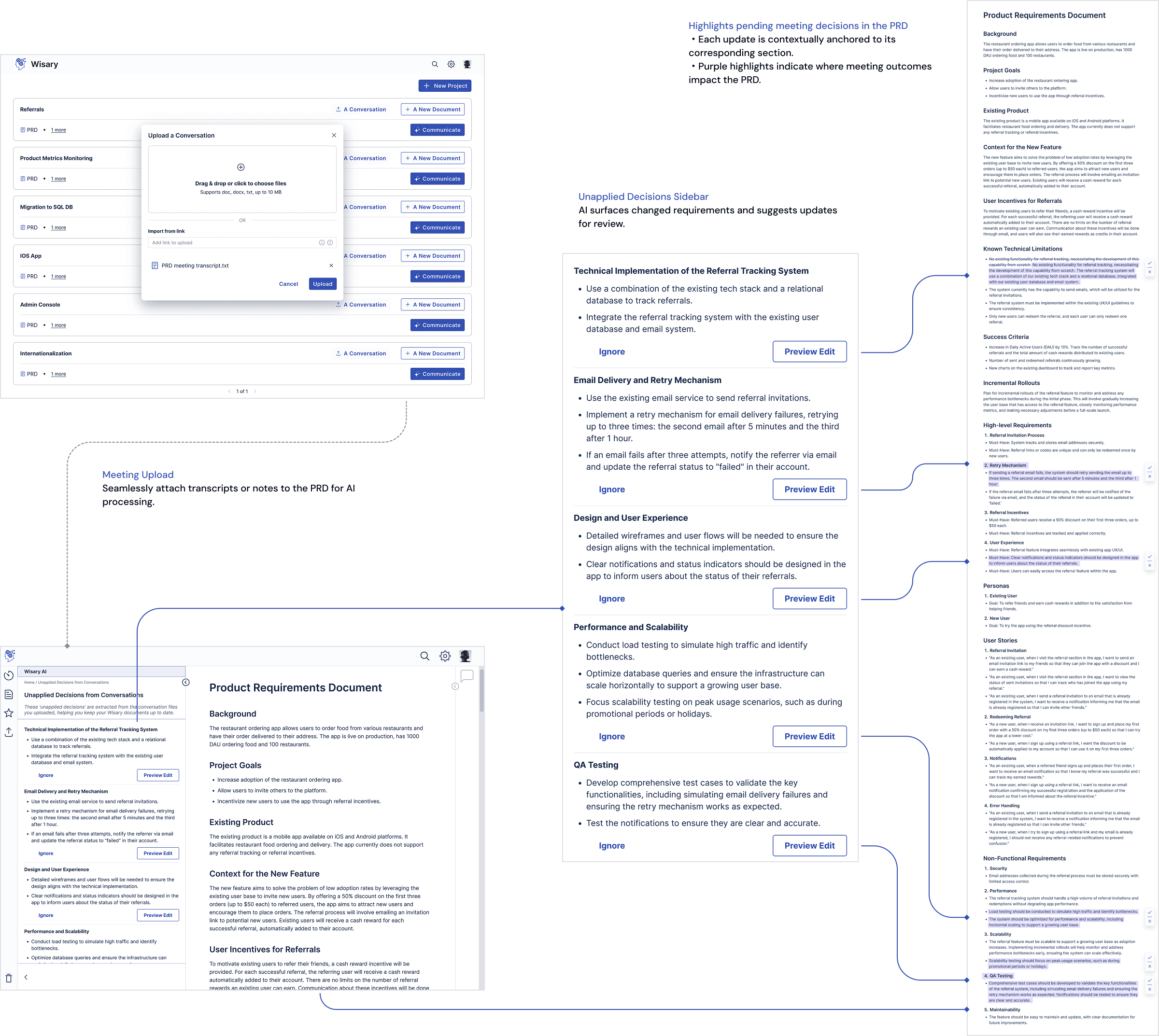
PMs upload a meeting transcript; Wisary extracts the decisions and flags the PRD with an "unapplied decisions" indicator, then suggests inline edits to apply them. For sharing, PMs generate stakeholder-specific perspectives (which they control before sending) and an FAQ that anticipates the questions leadership will ask.
Impact
Meeting decisions flow back into the document instead of evaporating; each stakeholder sees only what's relevant to them; and PMs walk into exec reviews already prepared for the hard questions.


Connect documentation to the engineering work that follows.
Context
PMs juggle Jira, Slack, and Confluence, and requirements get lost in the handoff to engineering.
Design challenge
How might we keep a PRD's requirements traceable into the engineering work that follows?
Solution
From a finalized PRD, an engineering lead creates a downstream Task Breakdown document with the same AI-assisted, human-approved pattern — and Wisary cross-references it against the PRD so nothing gets dropped in translation.
Impact
Requirements stay traceable from the PRD into structured engineering tasks, closing the loop between what was decided and what gets built. (Deeper integration with Jira and Confluence — so tasks sync into the tools engineers already use — was a direction we explored with the founder and scoped as a future step.)

Design System
We built the interface based on the Radix Design System, ensuring visual consistency, accessibility, and scalable component structures across Wisary’s AI-assisted workflows.
Reflection
What This Project Actually Taught Me
We were handed a brief for the wrong users and a solution nobody had validated: "build a feature to generate detailed requirements." The most important decision we made was the earliest one — to stop and ask whether that was even the problem. It wasn't. The research reframed the whole project around retention, and the design that followed came from what users told us, not from the original ask.
That's the real lesson I took: a designer's job isn't to execute the brief faster — it's to make sure it's the right brief. On this project, research didn't just guide the UI; it redirected the product strategy. Sitting with the founder as she used our flows to figure out what Wisary actually does was the moment I understood how far design reaches when it starts from the problem instead of the solution.
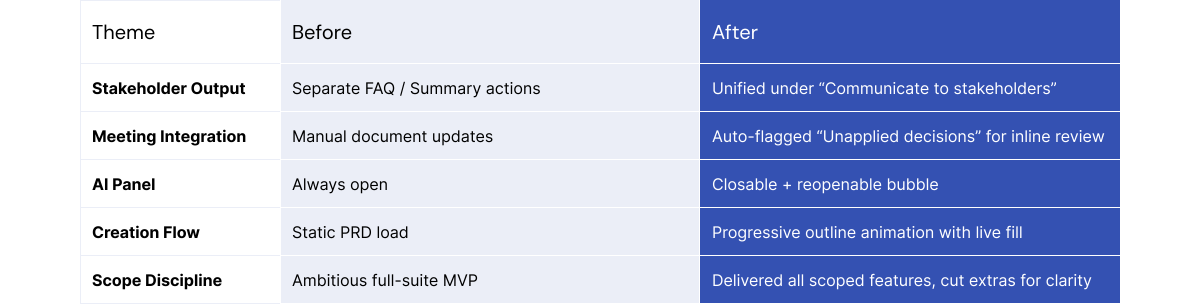
On the craft side, the turning point was late: we pulled Wisary from a collage of separate features into one coherent product — unifying every stakeholder handoff under a single intent, "Communicate to stakeholders," and making the meeting-to-document loop tangible through "unapplied decisions." With only three days in Dev Mode, we learned to prioritize guidance over clutter.
Reviewing the final designs, the founder wrote that they made AI feel like "just another team member who knows how to ask good questions" — the collaborator, not the chatbot, we'd set out to build.
What I'd Do Differently
Recruiting perfectly-matched users on a startup timeline was hard, and only a portion of our 23 participants were the exact target persona — non-technical PMs on offshore teams. If I ran it again, I'd protect that sample harder. And because the timeline ended at handoff, the designs were validated through founder demos rather than usability testing with those users — which is precisely why usability testing sits at the top of my Next Steps.
What Changed at the End
Next Steps
Usability Testing & Heuristic Validation
Run 3–4 short tests with PMs on:
・Discoverability of the “Communicate to stakeholders” CTA
・Clarity of “Unapplied decisions” indicators
・Comfort toggling AI panel visibility during editing
Real-world Integration
Prototype integrations with Confluence, Slack, or Jira, where PMs already live. This was one of the strongest signals from Ala’s demo feedback.
Empty & Transitional States
Design “first-time” screens — when there are no downstream docs, FAQs, or transcripts — to guide users toward first actions.
System Feedback Design
Add micro-success states (“Decision applied ✓”) across the app for better closure and satisfaction.