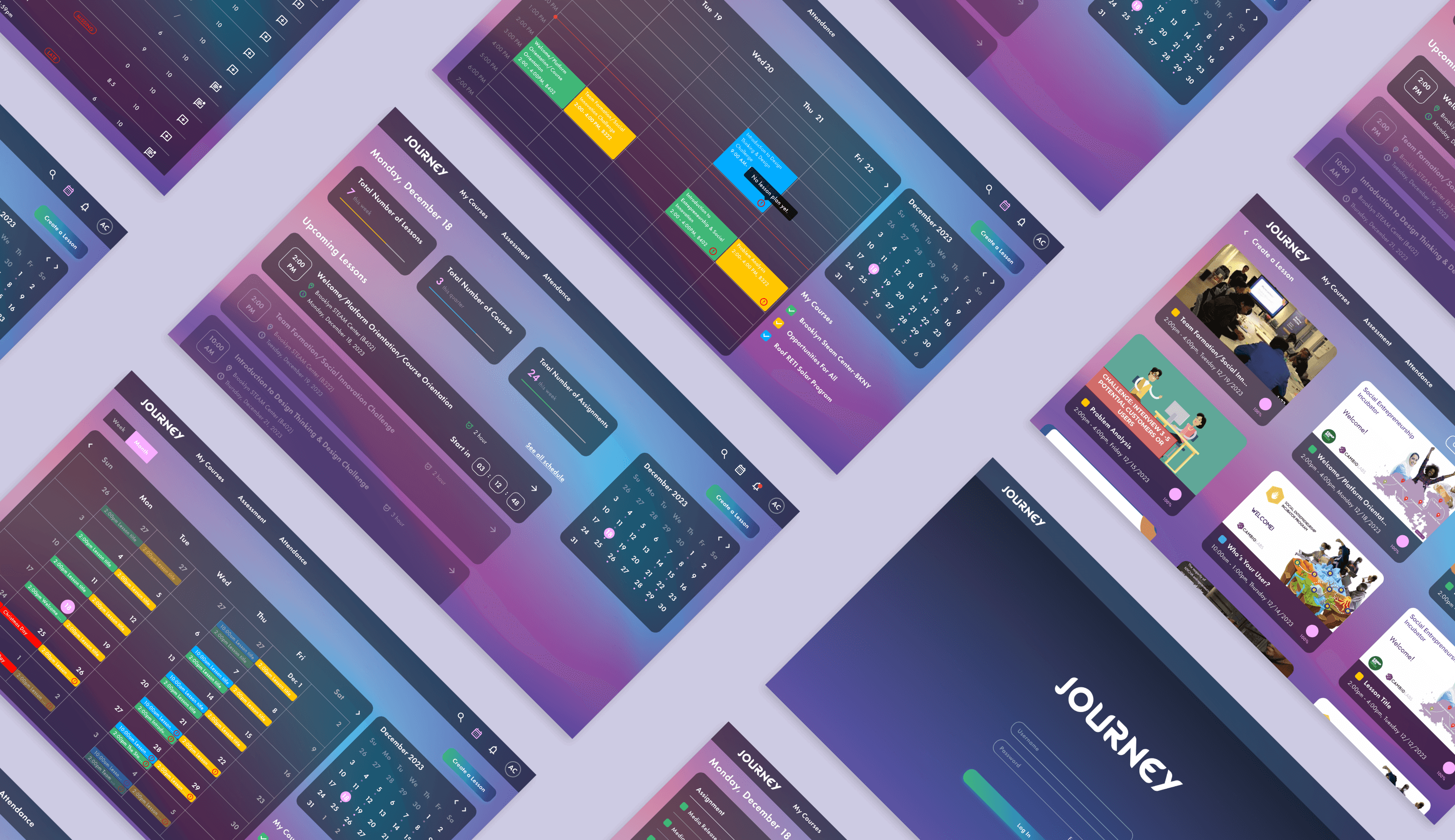
Journey
Empowering Educators with Streamlined Planning and Confident Teaching
Journey equips instructors with an intuitive, centralized platform to onboard, plan, and teach with confidence. By unifying class tools, integrating customizable lesson plans, and embedding built-in guidance, the new design enhances usability, reduces training overhead, and supports Cambio Labs’ mission to empower social impact educators.
Client
Cambio Labs
My Role
UX Research
UX Design
Prototyping
Tools
Figma
Miro
Trello
Calendly
Timeline
12 Weeks
Dec 2023 - Mar 2024
Team
Kaye Carter
Ogue Addeh
Jan Michael
Background
Cambio Labs is a nonprofit organization that provides educational technology and curricular programs to transform students into social entrepreneurs, designers for impact, and community activists. They built Journey, an online learning platform featuring multimedia lessons, challenges, and gamified rewards. The platform’s users include students, course creators, and instructors. Instructors use Journey to deliver courses and manage their classes.
The Challenge
In this project, our team focused on instructors. We needed to design an effective, intuitive way for instructors to get onboarded to Journey, complete necessary training, review their course assignments (classes, schedules, rosters), customize lesson plans, and deliver lessons on the platform. This was critical because currently one administrator (the program director) had to manually create all lesson plans and train each instructor for every new course, creating a bottleneck. Instructors often pieced together materials from multiple sources and felt unprepared. Our goal was to streamline instructor onboarding and planning so that any instructor – even without formal teaching experience – could confidently start teaching with minimal hands-on guidance.
Research
Overview
We conducted qualitative research to deeply understand instructors’ real experiences, pain points, and goals when using the Journey platform. Our methods included:
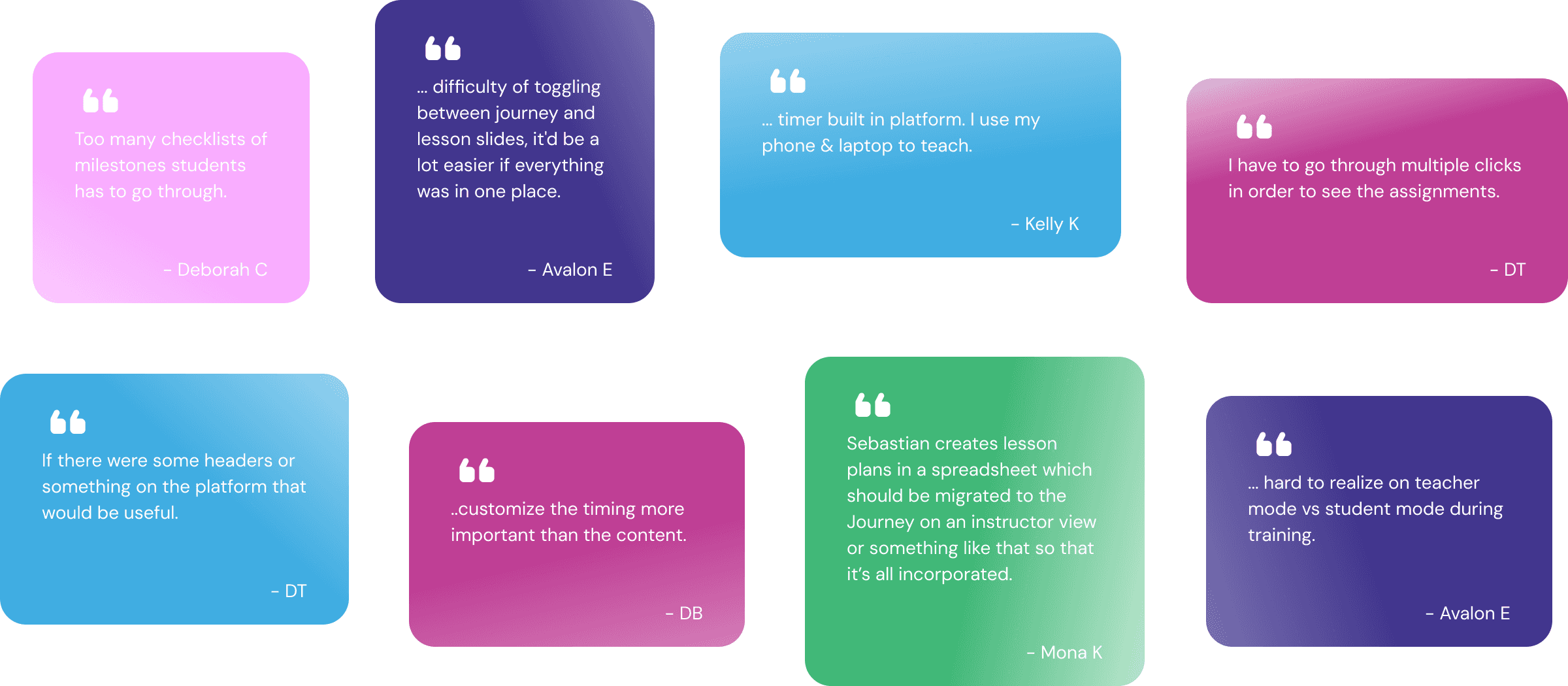
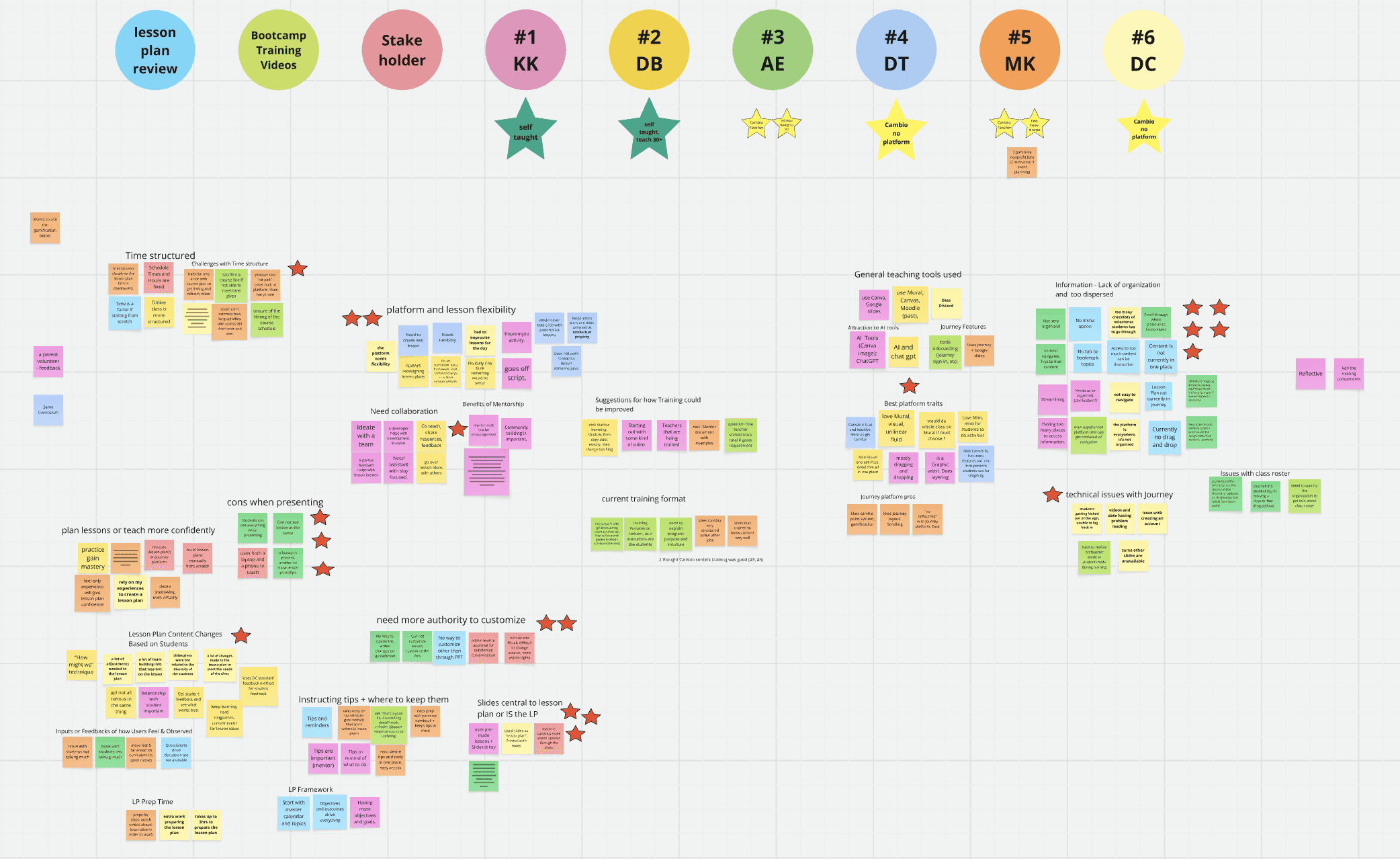
・Interviews: We conducted 7 interviews: 6 instructors — including 4 from Cambio Lab (2 of whom had used the Journey platform) and 2 from external programs — and 1 curriculum stakeholder (the Head Administrator at Cambio Lab). The instructor sample included both new and veteran educators with varying levels of familiarity with the system.
・Observational Study: We reviewed Cambio Lab’s internal instructor training videos and lesson plan materials to understand onboarding flow, instructional expectations, and the actual tools in use.
Goal
To uncover how instructors currently teach, onboard, and adapt lesson materials—and identify opportunity areas to improve confidence, efficiency, and independence in their workflow.
Define
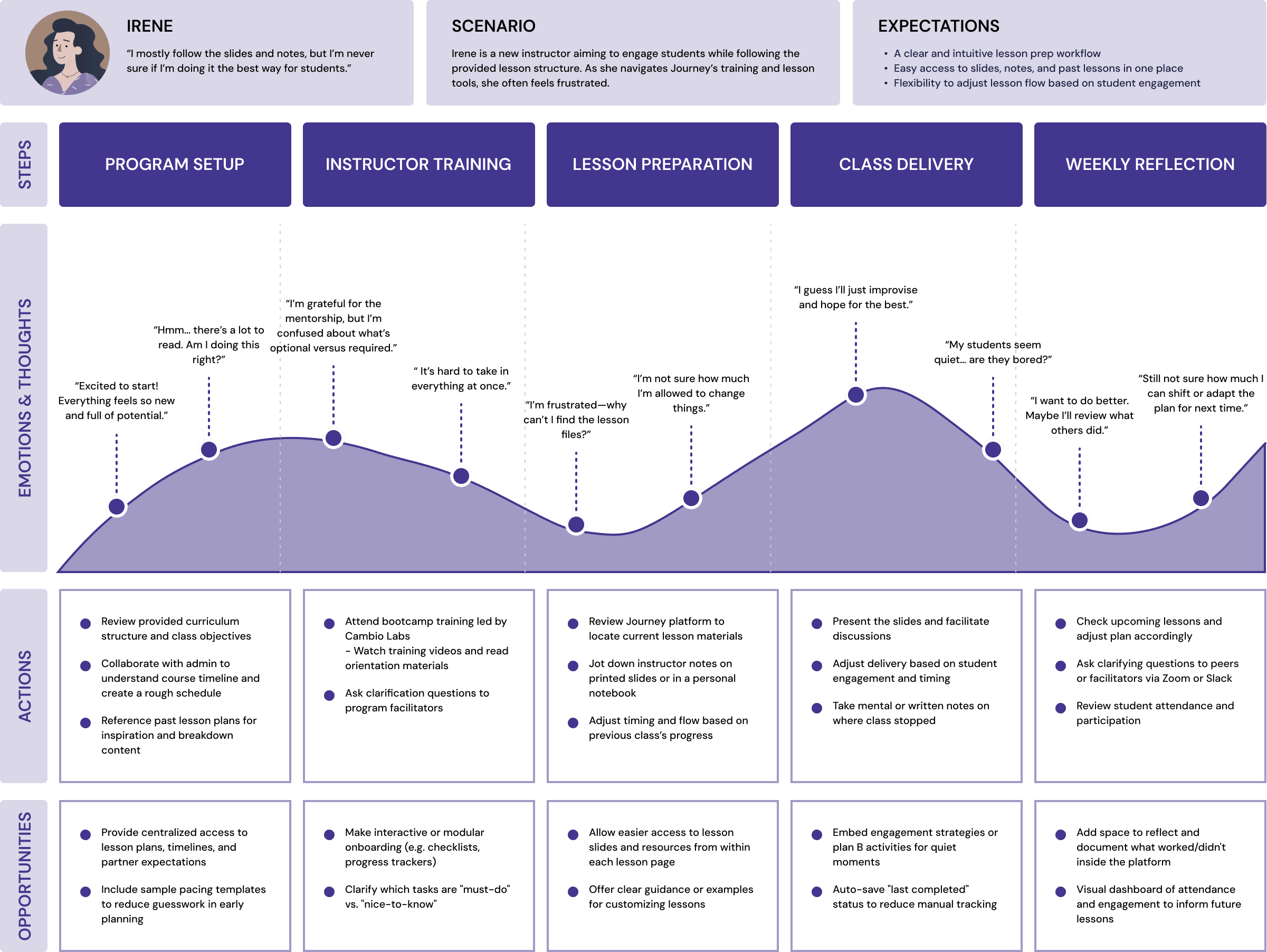
Problem Statement
Instructors need a centralized, user-friendly way to learn the Journey platform and prepare their courses because currently they rely on manual processes, scattered resources, and intensive one-on-one training, which leads to frustration and inefficiency. We framed this in a How Might We format: “How might we enable an instructor to get onboarded and ready to teach on Journey with confidence and minimal hand-holding?”
From this, we broke the challenge into specific user stories and requirements.
・As a new instructor, I want an interactive tutorial or guide when I first log in, so I can learn how to use the platform on my own.
・As an instructor, I want all my class information (schedule, roster, lesson content) in one dashboard, so I don’t have to check multiple places.
・As an instructor, I want to easily customize a lesson plan (e.g., add or remove activities, adjust timing) to fit my class’s needs.
Ideate
Design Exploration: Low-Fidelity Sketches
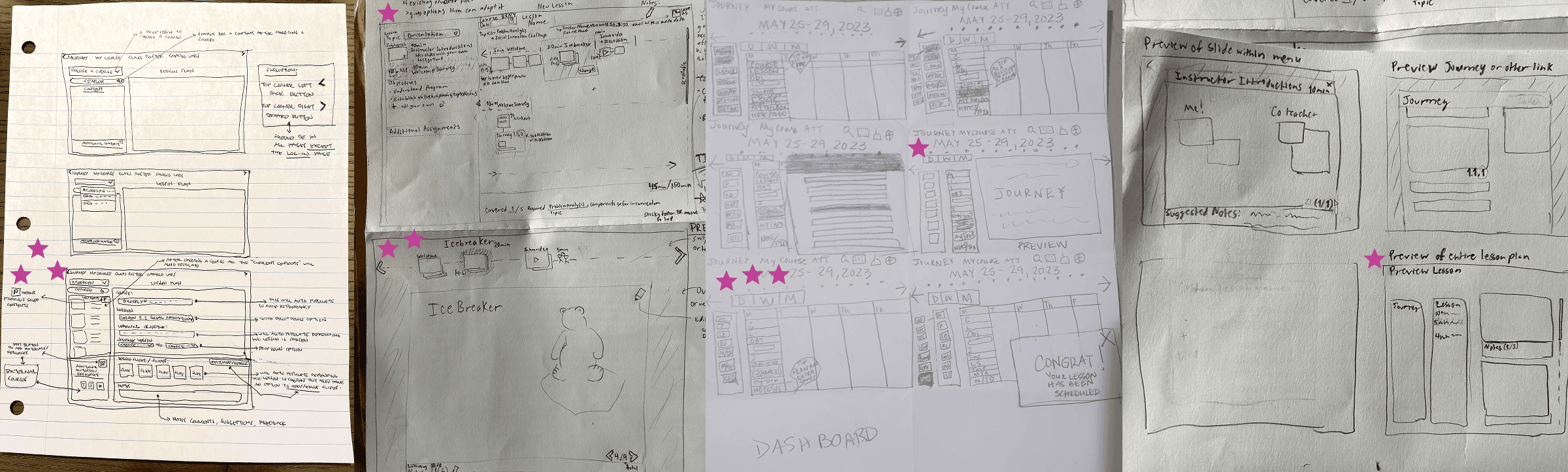
1. Instructor Dashboard View
・Weekly calendar layout for lesson planning
・Left-side navigation panel to access Lesson Plans, Notes, Journey links, etc.
・Visual confirmation (e.g. “Congrats! Your lesson has been scheduled”)
We wanted to make lesson planning visual and time-oriented. Instructors expressed a need to see content spread across a timeline to prepare more confidently.
2. Lesson Builder Flow
・Content structure broken down by topic and time (e.g. 10 min Icebreaker)
・Preview of embedded content (Journey links, videos, slides)
・Suggested notes section and editable objectives
Instructors desired flexibility while still staying within structured expectations. This sketch aims to blend a guided curriculum with room for customization. It also previews content instructors might use in class, reducing anxiety from switching platforms.
3. Content Preview & Navigation
・Preview of full lesson plan vs. individual slides or links
・Ability to review slides in context before teaching
・Sticky navigation arrows for moving between pages/modules
To reduce platform friction, we designed previews so instructors can understand what’s coming without jumping between tabs. Sticky navigation improves continuity.
4. Course Selection & Content Filtering
・Dropdown menu to select courses
・Auto-filled lesson structure with expandable lesson blocks
・Tags for “required,” “editable,” and “external” resources
We aimed to reduce decision fatigue by providing default lesson plans that can be easily edited. The distinction between required vs. optional content aligns with instructors’ needs for clarity and autonomy.
These sketches reflect an iterative process informed by user insights. We deliberately kept them low-fidelity to encourage feedback and quick adaptation. Moving forward, these concepts will guide our wireframes and usability testing.
Test
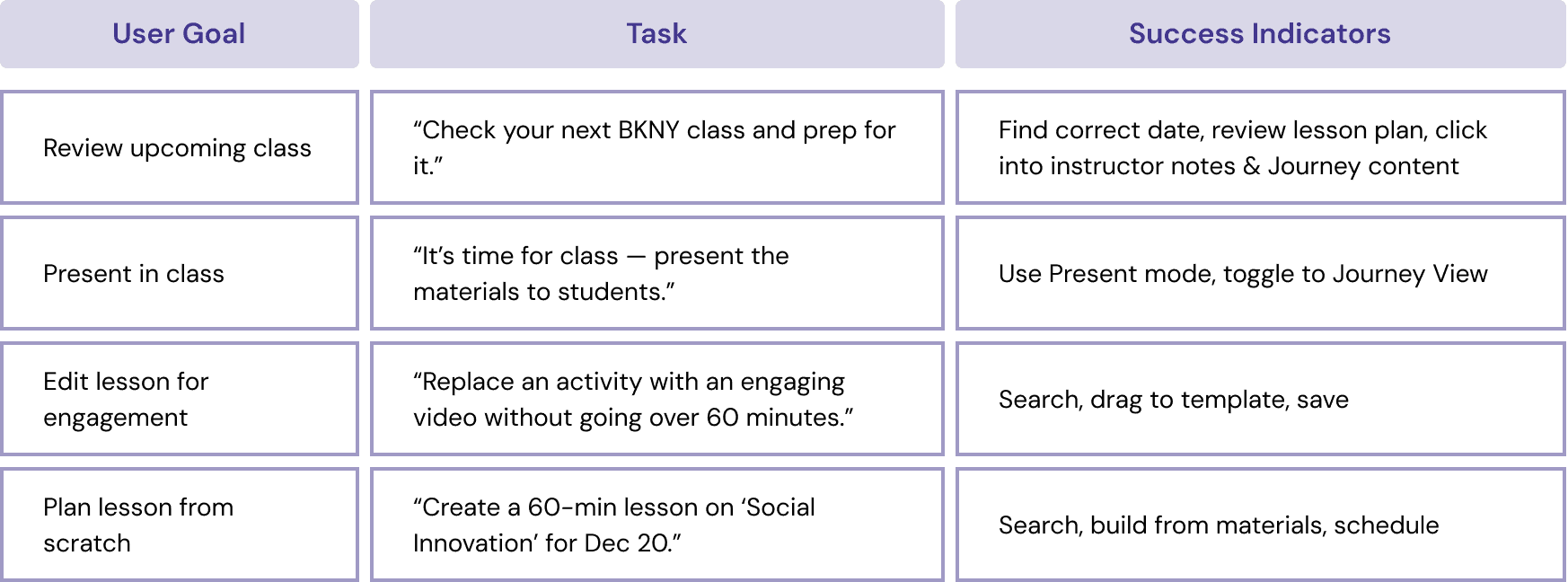
To evaluate the effectiveness and intuitiveness of our redesigned Journey platform, we conducted task-based usability tests with real instructors. Our goal was to understand whether new and experienced users could confidently navigate the system, complete key tasks, and feel empowered to deliver lessons with minimal guidance.
We tested with 4 users:
・2 Cambio Lab instructors with limited teaching experience.
・2 external educators, including one self-taught veteran.
All tests were remote and ~30 minutes long.
Tasks & Measures
Key Findings
What Worked Well
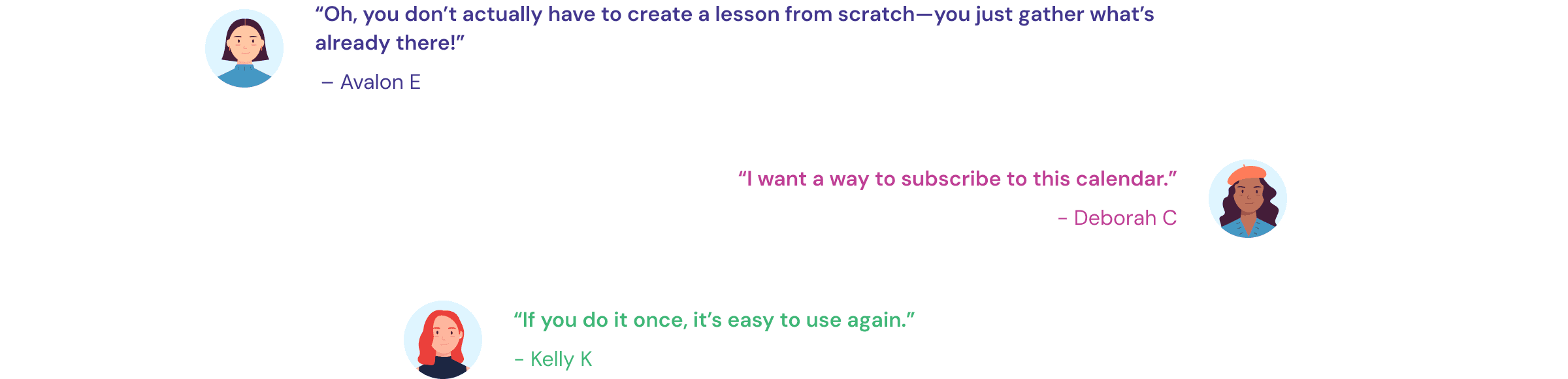
・“Solved the biggest issue of scattered materials” — All users appreciated the centralization of lesson content.
・Clear visual design — Described as “clean,” “similar to Google Calendar,” and “easy to reuse after one try.”
・Instructor-facing journey and slide preview felt intuitive when presented clearly.
・Users liked the ability to customize lessons and expressed excitement about scheduling features.
Usability Pain Points
・Lesson Creator was confusing — Users didn’t understand what each item in the left panel represented.
・Scheduling not obvious — Users struggled to assign a lesson to a specific date.
・Slide previews misleading — Identical thumbnails caused confusion. Full-slide previews were preferred.
・Terminology mismatch — Labels like “Journey Section” or “Additional Materials” were unclear.
Opportunities
・Add time blocks and lesson duration indicators.
・Allow instructors to see, preview, and edit all content before selecting.
・Clarify file drawer categories (e.g., “Saved Lessons” vs. “Journey Slides”).
・Include optional mentor notes, tips, and previous teaching examples.
Design
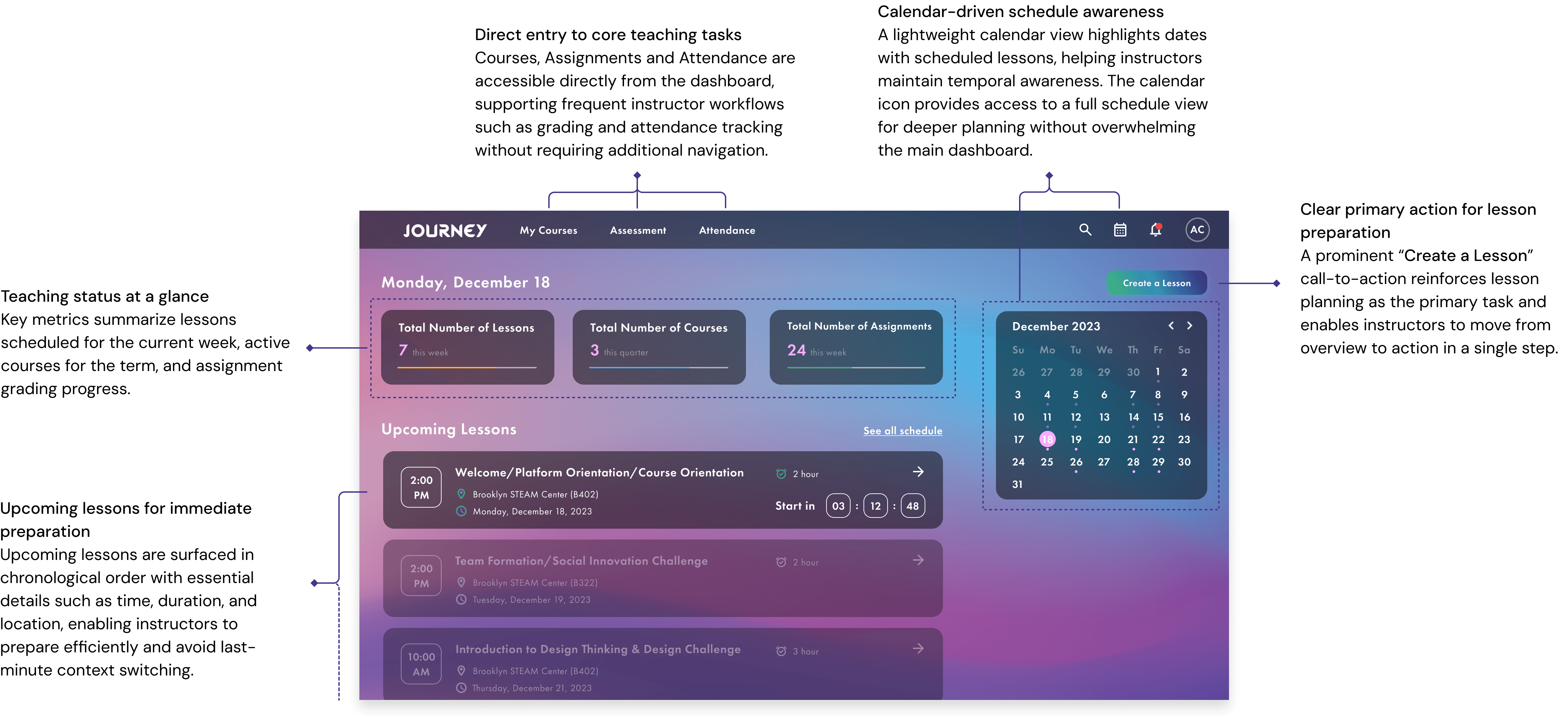
Dashboard Overview & Key Entry Points
The dashboard is designed as a central command center that helps instructors quickly understand their teaching status, plan upcoming lessons, and take action with minimal navigation.
Modular lesson creation through guided assembly
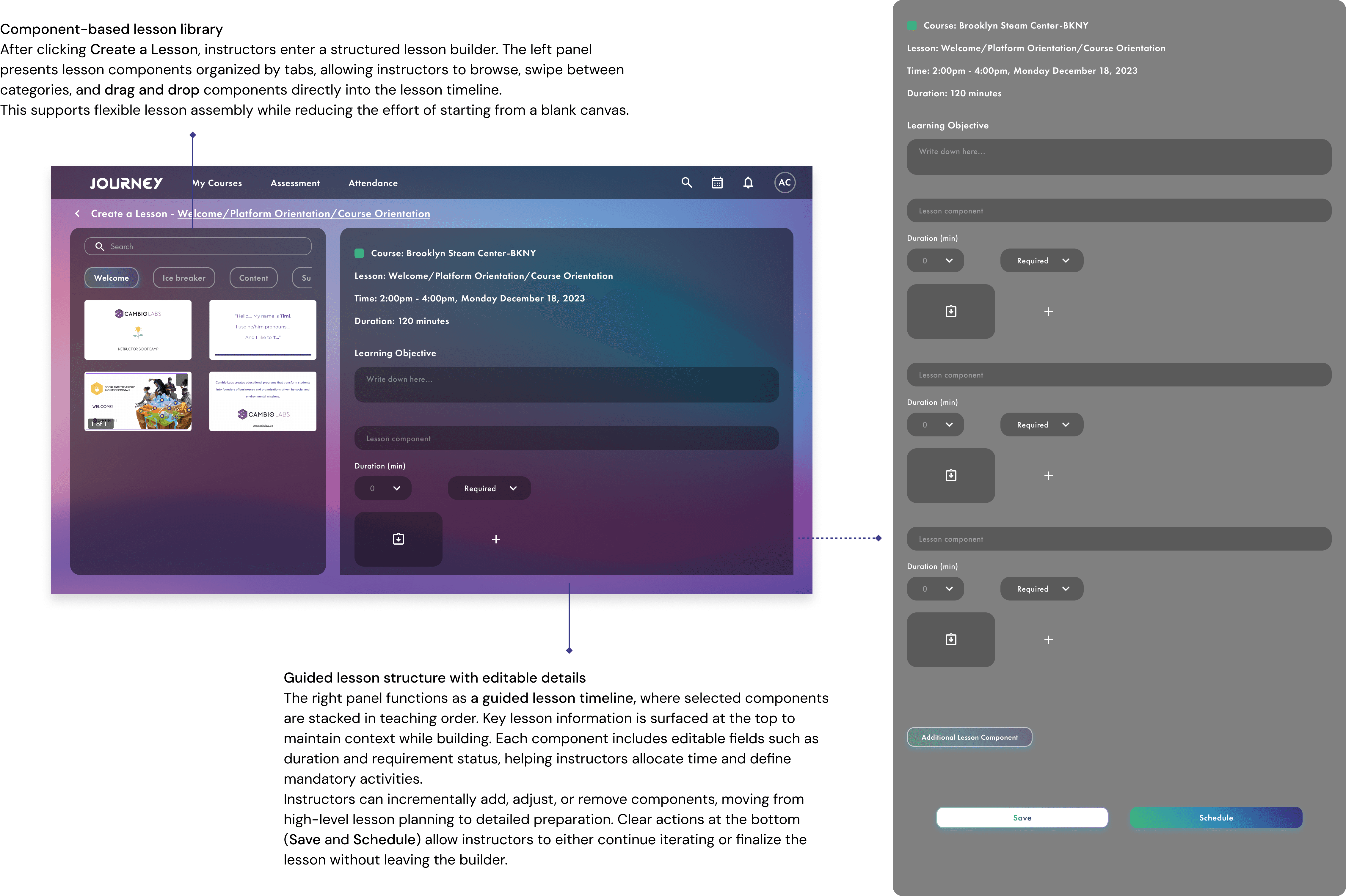
The lesson builder is designed as a guided assembly workspace that helps instructors create structured, teach-ready lessons by selecting, arranging, and refining modular components—without starting from a blank page or managing complex setup steps.
Structured lesson delivery with real-time guidance
The course presentation mode is designed to support live lesson delivery by combining a structured course outline with real-time teaching content. It helps instructors stay on pace, track progress, and focus on teaching without switching between tools or views.
Reflection
Designing Journey reinforced the importance of aligning interface structure with instructors’ real teaching workflows. Moving from dashboard overview to lesson creation and finally into live course presentation highlighted how instructors think in terms of planning, pacing, and execution, rather than isolated features.
This project also deepened my understanding of how guided structures can reduce cognitive load without limiting flexibility. By using modular components, progress tracking, and built-in timing support, the design helps instructors stay focused on teaching instead of managing tools.
If time allowed, future iterations would include additional usability testing during live teaching sessions, improved collaboration features for co-instructors, and deeper customization of lesson pacing based on class dynamics.